MultiControl v.04
by alexarje • Monday 25 February 2008 • Uncategorized • 32 Comments
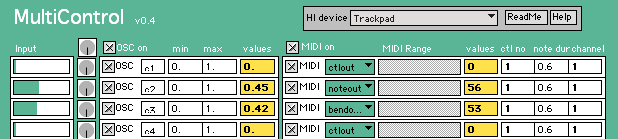
It has taken a while, but I finally found some time to update my MultiControl application. This was a small program I made back in 2004, and have updated a couple of times since then (that’s why the patching code looks so horrible, please don’t look at that…).
Originally, I made it for a series of workshops with kids, but I have also used it in a few concerts. Inspired by some blog comments and e-mails, I am happy to announce version 0.4. The main changes are:
- It handles 20 inputs (I will make this dynamic at some point, but then I will need to repatch the whole thing)
- Saving/reading of preset files should now work properly (again)
Thanks for your patience, and please let me know if you have any problems.
Alexander, your work in Multicontrol is much appreciated! I was about to mail you about the saving problem (I began using the software today and I had 0.3) and it’s awesome to see that you had it fixed.
I study at UFRJ – it’s the largest music university in Brazil. I am beginning to take Musical Technology classes and Multicontrol was a terrific introduction to Max.
I will probably use Multicontrol on stage as soon as I can. It will work wonders!
Thank you again! Compliments from Brazil!
Pingback: Minitronics.net » minia, Open hardware sensor board
Pingback: Create Digital Music » Dreamcast Arcade Stick as MIDI Controller
Pingback: Dreamcast arcade stick turned into a midi Controller | Secret porn
Pingback: UniTy Rec. Blog » Blog Archive » Arcade stick as a midi controller
Pingback: Dreamcast Arcade Stick as MIDI Controller - Home Recording Zone
Pingback: Sega Dreamcast Arcade Control as a Legit Midi Device « Poor Man's Guide to Making Music
Pingback: SURVIVALIST AV: Hacking EEG detectors to make art
Sigh… doesn’t work for me on Leopard, says arch is not supported (and I’d think Intel would be right).
Any hints anyone?
Sorry about the problems. It has been on my to-do list for a very long time to do a complete overhaul of MultiControl, but I just never find the time to do it. I even just noticed that the links to the software were broken. I have corrected the links, and have also uploaded the source files here now. It should be possible to run this with Max (or Max runtime), and hopefully someone might take the challenge of making a new standalone application.
If anything, I hope you find time to overhaul it.
I’m trying to map an Arcade Stick to Virtual DJ, and the ONE video on the internet links here, saying to download this HIDtoMIDI and Max Runtime and ‘viola’. Of course I have no idea how to work your program OR code the device XML to recognize the new MIDI signals (assuming I used Max Runtime correctly). Help would be much appreciated, and a tutorial would be beyond helpful.
Did you try this version:
http://www.fourms.uio.no/software/MultiControl/
You shouldn’t need Max Runtime, as it has been bundled as a standalone.
Thank you for making this available! I just built a controller with a uHID nano and it looks like all the inputs are communicating with the Multicontrol! Do you have any suggestions for getting the Mac Midi Setup Prefs to recognize the signals as a new controller or having a DAW like Pro Tools to recognize the signals? I have tried with PT with no luck but I think I saw somewhere else Ableton worked and was going to try tonight.
Again many thanks!
Hi alexarje, got the connection issue solved. I resolved it first in Ableton and then in PT. I missed the part of your tutorial that explained the “MIDI device” at the bottom. Once I identified my controller, then I enabled in DAW and done. Huge thanks for helping me finish a huge class project this quarter!!!
Alexander,
What a practical and ingenious program – I’ve just had hours of fun with an otherwise useless game controller getting it to play music!
Now I’m getting serious about it, I’m trying to figure out how to map the various buttons which MultiControl has recognised to specific MIDI notes.
The only way I can seem to do this is by dragging the MIDI range from 0 to the number I need – which creates a note-on, note-off arrangement – but it seems difficult or impossible to be precise within one or two numbers, the box is very small.
Am I missing something – or was MultiControl never intended to do this!
Best regards,
Andy
I think I’ve figured it out – edit the XML file! It’s too late at night to try it now, but I’ll do it tomorrow. Hopefully that will do the trick!
Sorry about the late reply. Great that you have figured it out. Yes, you can edit the XML file as much as you like. It would be good to include more advanced settings in the application, but unfortunately I have not had time to implement new features in this application for a while.
It is open source, though, so if anyone wants to take the source patch and modify it, please go ahead!
Alex,
Thanks very much for getting back to me confirming what I hoped about the xml file. I’m about to have a go. If I can just enter the appropriate range note numbers, I’ll be sorted! I was very impressed at how quickly it registered the controls as they were moved, and I was able to test it enough to know that it would work as planned.
Best regards,
Andy
Pingback: Software and MIDI « Electronica
Save and load function doesn’t work ???
Please let me know what I’m doing wrong…?
Thanks
Which OS are you on? I have a beta version available here:
http://www.fourms.uio.no/software/MultiControl/MultiControl_v06_OSX.zip
Could you please try this one and see how it works for you?
Alex
This is a great app. Need to spread the word. One question is there any way that multicontrol can access 2 controllers simultaneously? I have created a usb arcade stick to use as a midi controller, however it is a 1player/2player split. I would like to use both at the same time, currently multicontrol is picking up the player 2 only.
any comments would be gratefully received
Scott
Thanks for your interest in my software. Adding support for more than one game controller at a time is on my to-do-list. Unfortunately, I have had very little time for programming recently, and don’t expect too much in the near future either. Hopefully, someone else can pick up on this and implement multi-HID-support.
i can’t download it anymore, can you please revive the site?
Which page have you been trying. MultiControl currently resides here: http://www.uio.no/english/research/groups/fourms/software/MultiControl/
I just checked the links there, and they seemed to work. Please let me know if otherwise.
Hi there great app,
can you please re upload a working zip of v.06 ?
it says file is corrupted , and i can’t save or load in v.04 using OS Lion.
Cheers,
(also any idea about possibly using multiple controllers in the future?)
Thank You,
A
Did you try the link here?
http://www.uio.no/english/research/groups/fourms/software/MultiControl/downloads/
I just downloaded the file and unzipped it successfully on my computer (OSX Mountain Lion). I will try another OSX version tomorrow.
Hi alexarje, I finnally was able to download and extract the v.06 , however It will not open/run on OSX 10.7 (Lion) it would seem. So im still faced with the issue of been unable to save my layout mappings , i have done so a few times, just minutes before a Performance and its a henderence to say the least
)
I have tried most of the Other HID/MIDI software apps,(both for PC & Mac) and yours offers the greatest flexibility and suits my needs the best. If You fixed the ability to Save. And added recognition/Use of MULTIPLE Controllers (Xbox in my case) This would be simply…..amazing!!!! You would have created one Hid/Midi App to rule them all
I would gladly use/advertise publicly, and in classrooms. And i would be more then Happy to make a Paypal Donation towards your work and the addition of these features .
A
I am sorry to hear about your problems. I have built a new version of the application with the latest version of Max, and that works fine here on my Mountain Lion system. Since I have received some feedback about problems with opening the previous zip-file, I have now created a dmg-file instead. Please find the latest installer here:
http://www.uio.no/english/research/groups/fourms/software/MultiControl/downloads/
Let me know if you still experience problems.
Hey, I have this problem using traktor.
I want it to be like this:
When I click the button it is Ch03.Note.B2.
I try it and it works BUT when I release the button it goes to Ch03.Note.C-1
How can I prevent this??
Hello, I like very much the app, but when downloading the v 062 I get the v3 (2007), and I am still not able to save/open mappings.
Can you please help me? I’m trying to download the latest version here
http://www.uio.no/english/research/groups/fourms/software/MultiControl/downloads/
But again, the v062 will install the v3…..
Any tips?
Same problem as above, downloading v062 to but after install it seems it installs v.3
and still no ability to SAVE or LOAD any mapping layouts
(
Please ,Please Fix.
i dont care with version i need to use, for it to work…. ill do ANYTHING, to be able to simply save/load a layout.