ARJ

Alexander Refsum Jensenius

Exporting references from Google Scholar

Posted on | July 17, 2008 | 4 Comments

I have written about the (hidden) possibility of exporting references from Google Scholar before, but since several people have asked about this lately, I will post a more detailed description of how you can do that here. It is very simple:

1. Go to Google Scholar

Google scholar

2. Select the Scholar preferences:

3. At the bottom of the preferences page you find a menu where you can choose which reference format you prefer (BibTex, Endnote, Reference Manager, etc.)
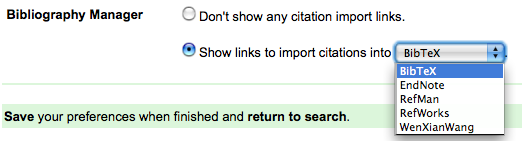
4. From now on, when you do your search you will see a link saying “Import into [BibTex, Endnote, etc.]“:

5. Click on the link, and you will get up a new window with your reference formatted according to your personal setting.
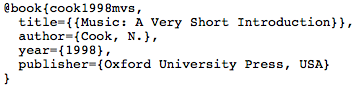
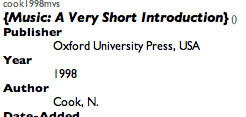
6. Copy the reference, and paste it into your reference manager (in my case BibDesk). Since Google’s automatic reference extraction isn’t always perfect, I often end up having to fix the reference a bit to get it correct. But this method still saves a lot of time and effort!
Comments

4 Responses to “Exporting references from Google Scholar”

  1. Dennis
    July 18th, 2008 @ 11:01

    Well, this method is a little bit too time consuming. Do you know you can just import bibliographic data directly into your collection using Wizfolio (www.wizfolio.com)? Just download Wizfolio bookmarklet and after you search in Google Scholar, click on the bookmark to import references into your account. Other databases are supported too.

  2. alexarje
    July 18th, 2008 @ 11:15

    Thanks for the comment. In fact, I wouldn’t say it is particularly time consuming. Setting it up takes 30 seconds, and copying a reference is just about clicking, copying, pasting and closing.

    I haven’t tried Wizfolio, but from what I can see on the web page it is somehow similar to CiteUlike (which I have used a little). But both of these are online services, and I really like to use a real application (in my case BibDesk) for handling my references (+ PDFs and other related media).

    If I were to change, I would probably start using Papers instead, which has a lot of nice importers built in.

  3. Alexander Refsum Jensenius » Google Scholar imports in Bibdesk
    July 18th, 2008 @ 12:21

    [...] I wrote about the possibility to import references from Google scholar into a reference program. Today I [...]

  4. College Library News :: Exporting references from Google Scholar :: July :: 2008
    July 18th, 2008 @ 14:22

    [...] from Norway, Alexander Refsum Jensenius, has written a short step-by-step instruction on how to export references from Google Scholar . could be useful. Commenters point to web apps like CiteULike, WizFolio and a downloadable app for [...]

Leave a Reply
